Pada posting artikel sebelumnya saya sudah menjelaskan bagaimana caranya melakukan pengelompokkan data dengan menggunakan LinqDataSource control. Contoh yang diberikan pada artikel tersebut hanya menggunakan satu kolom sebagai kunci pengelompokkan datanya. Di kesempatan ini saya akan memberikan contoh bagaimana melakukan pengelompokkan data dengan menggunakan lebih dari satu kolom. Berikut preview gambar dari hasil pengelompokkan data dengan multiple kolom untuk mengelompokkan data Customers dari tabel Northwind berdasarkan Country dan City.
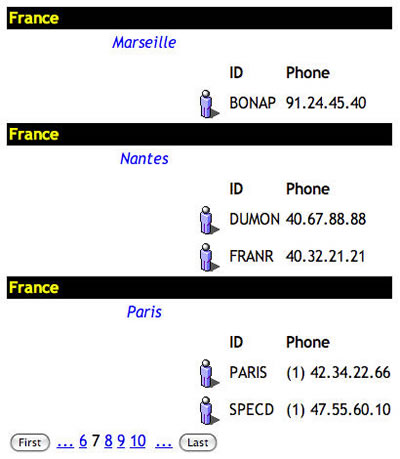
Seperti yang telah diketahui sebelumnya untuk melakukan pengelompokkan data pada LinqDataSource (LDS) kita harus menggunakan atribut GroupBy yang diisi dengan nama kolom sebagai kunci pengelompokkan data. Kolom yang digunakan untuk mengelompokkan data didefinisikan dengan keyword "Key" yang digunakan pada Select atribut dari LDS. Berikut potongan kode html untuk melakukan pengelompokkan data dengan multiple kolom :
<asp:LinqDataSource ID="LinqDataSource1" runat="server"
    ContextTypeName="NorthwindDataContext"
    TableName="Customers"
    Select="new(Key, It as Customers)"
    GroupBy="new(Country,City)" >
</asp:LinqDataSource>
Keyword "new" pada atribut GroupBy digunakan bila kita ingin mengelompokkan data dengan lebih dari satu kolom. Sedangkan keyword "new" pada Select atribut digunakan kalau kolom kolom yang akan ditampilkan kita batasi untuk beberapa kolom saja. Kalau keyword "new" tidak digunakan pada Select atribut maka LDS akan menampilkan semua kolom yang terdapat pada Entity Class tabel yang bersangkutan pada DataContext classnya. Sebagai informasi, perintah "new" pada Select statement ini akan generate Dynamic Class.
Seperti biasa, kita dapat gunakan beberapa DataBound control untuk menampilkan data, pada contoh kali ini saya gunakan Databound contro favorit yaitu ListView :). Lalu bagaimana caranya untuk menampilkan data hasil pengelompokkan multiple kolom tersebut? Gunakan perintah "Key"...perintah ini mengacu pada nama-nama kolom yang didefinisikan pada atribut GroupBy. Jadi untuk menampilkan data Country misalnya digunakan perintah seperti ini : "<%# Eval("Key.Country")%>" , untuk kolom City seperti ini : "<%# Eval("Key.City")%>" . Berikut potongan kode html pada ItemTemplate dari ListView :
<ItemTemplate>
    <tr>
        <td colspan="3" style="font-weight: bold;
        background-color: Black; color: Yellow">
            <%#Eval("Key.Country")%>
        </td>
    </tr>
    <tr>
        <td colspan="2" align="center"
        style="font-style:italic; color: Blue">
            <%#Eval("Key.City")%>
        </td>
    </tr>
Berikut kode html lengkapnya :
<html xmlns="http://www.w3.org/1999/xhtml">
<head runat="server">
    <title>Data Grouping With Multiple Column</title>
</head>
<body>
    <form id="form1" runat="server">
    <div>
    <asp:ScriptManager ID="ScriptManager1" runat="server" />

    <asp:LinqDataSource ID="LinqDataSource1" runat="server"
        ContextTypeName="NorthwindDataContext"
        TableName="Customers"
        Select="new(Key, It as Customers)"
        GroupBy="new(Country,City)" >
    </asp:LinqDataSource>

<asp:UpdatePanel ID="UpdatePanel1" runat="server">
    <ContentTemplate>
        <asp:ListView ID="ListView1" runat="server"
        DataSourceID="LinqDataSource1">
            <LayoutTemplate>
                <table cellpadding="2" cellspacing="2">
                    <tr id="itemPlaceholder" runat="server">
                    </tr>
                    <tr>
                    <td>
                        <asp:DataPager ID="DataPager1"
                        runat="server" PageSize="3">
                        <Fields>
                            <asp:NextPreviousPagerField
                            ButtonType="Button"
                            ShowFirstPageButton="True"
                            ShowNextPageButton="False"
                            ShowPreviousPageButton="False" />
                            <asp:NumericPagerField />
                            <asp:NextPreviousPagerField
                            ButtonType="Button"
                            ShowLastPageButton="True"
                            ShowNextPageButton="False"
                            ShowPreviousPageButton="False" />
                        </Fields>
                        </asp:DataPager>
                    </td>
                    </tr>
                </table>
            </LayoutTemplate>

            <ItemTemplate>
                <tr>
                    <td colspan="3" style="font-weight: bold;
                    background-color: Black; color: Yellow">
                        <%#Eval("Key.Country")%>
                    </td>
                </tr>
                <tr>
                    <td colspan="2" align="center"
                    style="font-style:italic; color: Blue">
                        <%#Eval("Key.City")%>
                    </td>
                </tr>
                    <tr>
                        <td align="right">
                        <asp:ListView ID="lvDetails"
                        runat="server"
                        DataSource='<%# Eval("Customers") %>'>
                            <LayoutTemplate>
                                <tr>
                                    <th>
                                    </th>
                                    <th align="left">
                                        ID
                                    </th>
                                    <th align="left">
                                        Phone
                                    </th>
                                </tr>
                                <tr id="itemPlaceholder"
                                    runat="server">
                                </tr>
                            </LayoutTemplate>
                            <ItemTemplate>
                                <tr>
                                <td align="right" valign="top">
                                   <asp:Image ID="img"
                                   runat="server"
                                   ImageUrl="~/images/person2.ico" />
                                    </td>
                                    <td>
                                        <%#Eval("CustomerID")%>
                                    </td>
                                    <td>
                                        <%#Eval("Phone")%>
                                    </td>
                                </tr>
                            </ItemTemplate>
                        </asp:ListView>
                        </td>
                    </tr>
                </ItemTemplate>

                </asp:ListView>

            </ContentTemplate>
        </asp:UpdatePanel>
    </div>
    </form>
</body>
</html>